
Quick Answer
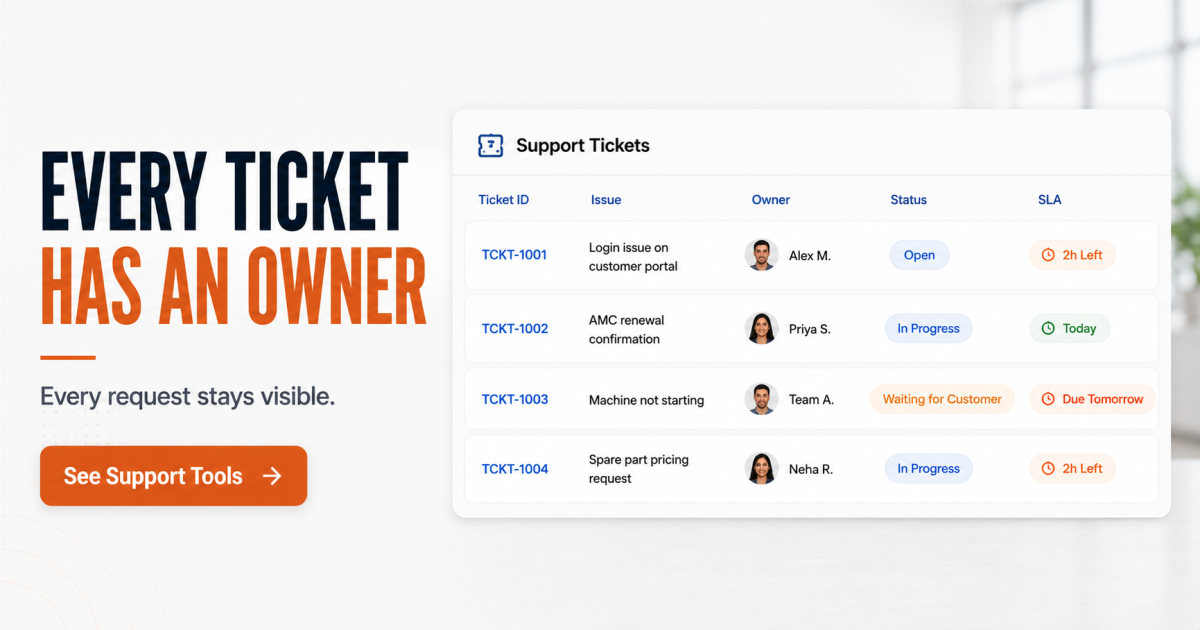
Support ticketing software turns customer complaints, requests, and questions — coming in from email, WhatsApp, or phone — into tracked, owned, time-bound tickets instead of scattered messages. Every ticket gets an owner, a status, and an SLA clock, so nothing sits unanswered because no one remembered it. For growing B2B teams handling requests across channels, this is where response time actually breaks down — not because the team is slow, but because no one owns the follow-up. Structured ticketing closes that gap before a customer escalates or churns.
One person on the support team keeps track of every open issue — mentally, in a personal notes app, alongside a dozen WhatsApp threads and a shared inbox nobody else checks regularly. This works until she goes on leave, or the ticket count crosses forty. Then a customer who complained on Monday is still waiting on Friday. Nobody flagged it. The account manager finds out only when the client threatens to cancel.
This is not a discipline problem. It is what happens when customer support runs outside any structured system. Support ticketing software fixes exactly this gap — giving every issue an owner, a deadline, and a visible status from the moment it is raised.
Why Support Requests Fall Through the Cracks
Most growing B2B teams do not lack effort. They lack structure. A handful of patterns repeat across almost every team we talk to:
This works until it doesn’t. A team can run on memory and goodwill for a while. Then the team doubles, or a high-value client escalates publicly, and the gaps become expensive fast.
Still tracking support on WhatsApp and email?
See how TargetCRM brings ownership and SLAs to every ticket.
See Support Tools
What Support Ticketing Software Changes in the Workflow
Here’s what changes when a request stops living in someone’s inbox and starts living in a system built for it. A customer request comes in — from any channel — and becomes a ticket automatically. That ticket gets assigned an owner the moment it’s created. An SLA clock starts running against it. If it sits untouched past the response window, it escalates on its own, without anyone having to notice and chase it manually.
The system owns the reminder, not a person. That single shift is what actually closes the gap — not a faster team, a structure that does not forget.
Every ticket also stays linked to the same customer record your sales team already works from. So when a support issue comes up, whoever picks it up sees the account’s full history — not just the complaint in front of them.
Inside TargetCRM’s Support Ticketing Tools
TargetCRM’s support ticketing tools are built around the same operational reality most SMB and mid-market teams face: requests come from everywhere, and someone always has to own the follow-up.
One system for sales and support
TargetCRM ties every support ticket to the same customer record as your sales pipeline.
Book a Walkthrough
What Changes for Management
Right now, if leadership asks “how many support tickets are open, and how long have they been sitting?” — the honest answer is usually “let me check with the team and get back to you.” With ticketing software in place, that answer is a live number, not a follow-up task. Management can see what’s moving, what’s stuck, and where a customer relationship is at risk before it becomes a cancellation conversation.
Response Time Is a Structure Problem, Not a Speed Problem
This is not a question of hiring faster people. It is a question of giving the people you have a system that owns the follow-up. Most support delays are not caused by a slow team — they’re caused by requests with no owner, no deadline, and no visibility until it’s too late. A basic service-level agreement structure, enforced by software instead of memory, closes most of that gap on its own.
Support that doesn’t depend on memory.
TargetCRM gives every ticket an owner, a deadline, and a visible status — before it becomes a churn risk.
Talk to Our TeamFrequently Asked Questions
What is support ticketing software in a CRM?
It’s a system that converts customer requests from email, WhatsApp, or phone into tracked tickets — each with an owner, a status, and a response-time target — instead of leaving them as scattered messages.
How does CRM ticketing improve response time?
It removes the dependency on someone remembering to follow up. SLA timers and automatic escalation flag requests before they go stale, so response time stops depending on who happens to notice a message first.
Can WhatsApp and email support requests be tracked in the same system?
Yes. Requests from multiple channels can flow into one ticket queue, so support isn’t split across inboxes that only one person checks.
What is an SLA in customer support ticketing?
An SLA (service-level agreement) sets a target response or resolution time for a ticket. In ticketing software, it’s enforced automatically — the system flags or escalates a ticket that’s about to breach it.
How does TargetCRM handle support escalations?
Tickets that cross their SLA window escalate automatically based on rules you configure, moving urgent issues ahead of routine ones without manual intervention.
Does a growing team need a separate helpdesk tool alongside a CRM?
Not necessarily. When support tickets live on the same record as sales activity, teams get shared visibility without maintaining two disconnected systems.